
Introduction
In the previous article, we covered how to create our environment and how to validate tokens. This time, we will explain how your backend API (still no AI topic in this article) can rely on the Entra Id Auth SDK (sidecar) to call a downstream API like Graph or any other API.
Time to bring a secret
You will see below that the Entra Id Auth SDK (sidecar) is able to do the client credential flow (application flow) and/or the On-Behalf-Of flow (human flow). Both flows require the usage of a “secret” that is used to validate a “trust”. In this article we will use the regular AppId secret, but be aware that you can do both flows with federated credentials to avoid using hardcoded secrets.
Within the official documentation, you can see that credential management can be handled in multiple ways. You can today:
- Use Kubernetes clusters and Kubernetes variants like ACA or ECS through workload identity federation
- Use a secret/certificate through Key Vault
- Use a secret/certificate directly (a solution to avoid)
For the rest of this article, we will simply use a secret that we will hardcode.
Docker configuration
Let’s recreate a new Docker environment, this time with the additional secret.
export TENANTID="<your tenant Id>"
export CLIENTID="<your client Id>"
export AUDIENCE="api://$CLIENTID"
export SECRET="your secret"

docker run --rm -it -p 8080:8080 \
     -e AzureAd__ClientId=$CLIENTID \
     -e AzureAd__TenantId=$TENANTID \
     -e AzureAd__Audience=$AUDIENCE \
     -e AzureAd__ClientCredentials__0__SourceType=ClientSecret \
     -e AzureAd__ClientCredentials__0__ClientSecret=$SECRET \
     -e DownstreamApis__Graph__BaseUrl=https://graph.microsoft.com/v1.0 \
     -e DownstreamApis__Azure__BaseUrl=https://management.azure.com \
     -e ASPNETCORE_ENVIRONMENT=Development \
     -e AzureAd__EnablePiiLogging=true \
     -e Logging__LogLevel__Default=Debug \
     mcr.microsoft.com/entra-sdk/auth-sidecar:1.1.2-azurelinux3.0-distroless
Compared to the previous article, we’ve added the 2 lines related to the secret declaration, but we’ve also added 2 endpoints called Graph and Azure. Those endpoints will be used later when we rely on the DownstreamApi route.
AuthorizationHeader
The AuthorizationHeader endpoint can be used if your web API needs to talk to Graph, Azure or any other backend API. This endpoint is used to fetch a token to access those resources!
On Behalf flow (OBO)
Remember, in the previous article we generated a token as a user (Authorization code flow) to access our web API (the declared audience). Now, if the web API needs to reach another API as the authenticated user (delegated permission), this is where you will have to use the OBO flow. Let’s request a Graph token as a user:
$ClientId = "<your client Id>"
$TenantId = "<your tenant Id>"

# Generate a token to access your web API (previous article)
$token = Get-EntraToken -PublicAuthorizationCodeFlow -ClientId $ClientId -TenantId $TenantId -Resource Custom -CustomResource "api://$ClientId" -Permissions user_impersonation | % AccessToken
Now that we have our token to allow our web API to accept the request, let’s request another token from your web API (through sidecar) to access Graph API:
irm "http://localhost:8080/AuthorizationHeader/Graph?optionsOverride.Scopes=user.read" -Headers @{ Authorization = "Bearer $token"} | % authorizationHeader
If we now decode the generated token in jwt.ms, we will see:
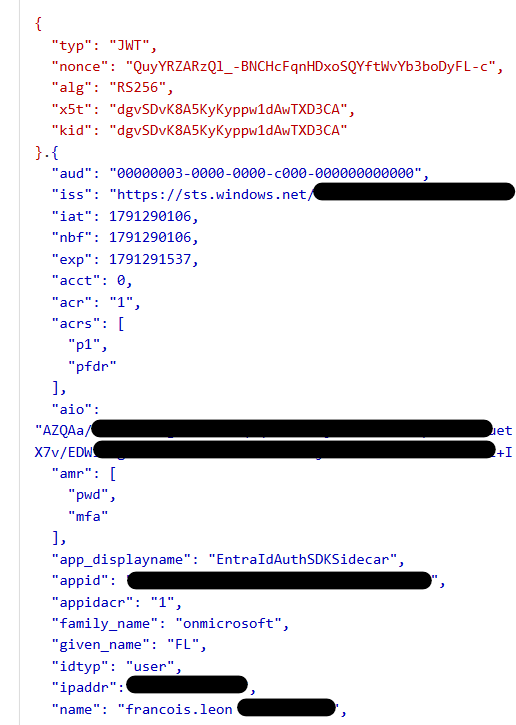
We can clearly see this is a JWT that represents the same identity that signed in to the web API (the $token).
And for fun, if you need to fetch a token to access Azure as a user, you can run:
irm "http://localhost:8080/AuthorizationHeader/Azure?optionsOverride.Scopes=https://management.azure.com/user_impersonation" -Headers @{ Authorization = "Bearer $token"} | % authorizationHeader
If you don’t grant the permission within your application, you should receive this error message:

Now if you grant the application:
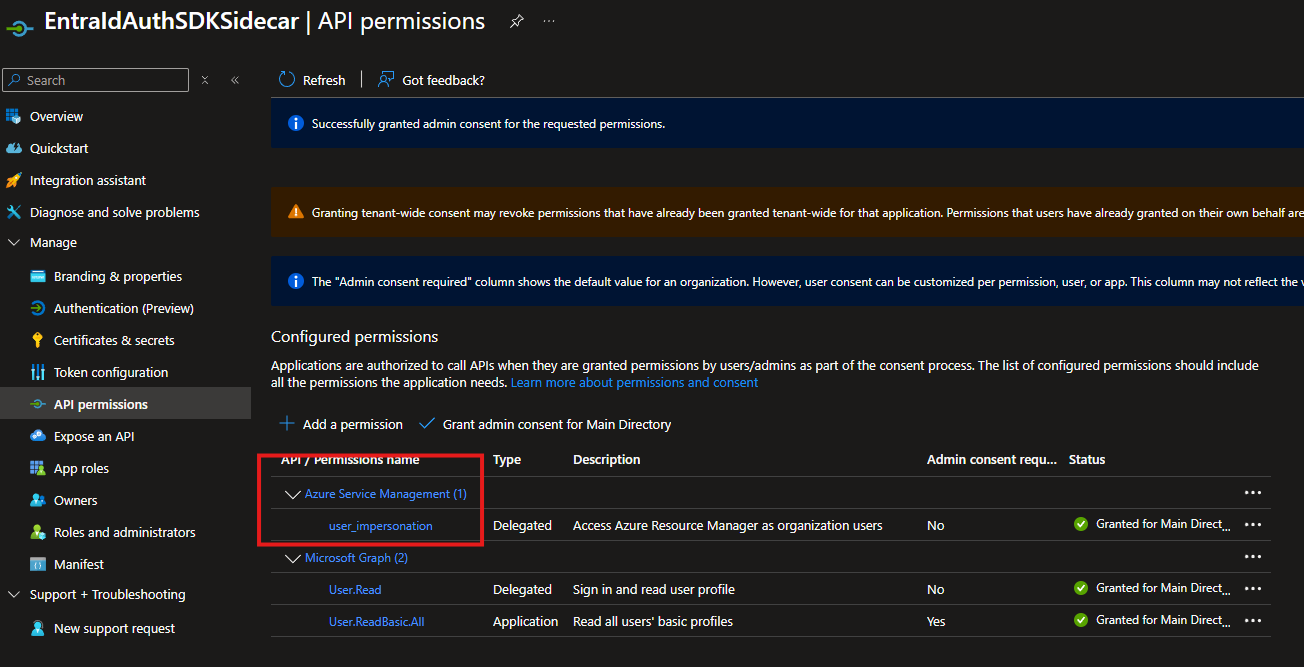
and retry, you should now see:

and if you decode the token:
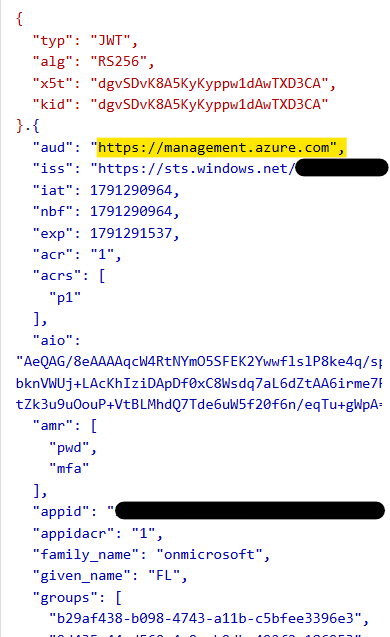
We now have a token to reach ARM as the authenticated user.
Client credential flow
Let’s now use the client credential flow. You enter as Francois, but your web API will call the backend API (Graph/Azure) as the Application, not the user anymore (Application permission).
To do this, you will have to add the RequestAppToken=true override parameter to force the application flow. In addition, don’t forget that the scope must now end with /.default.
Here is an example to call Graph API:
irm "http://localhost:8080/AuthorizationHeader/Graph?optionsOverride.RequestAppToken=true&optionsOverride.Scopes=https://graph.microsoft.com/.default" -Headers @{ Authorization = "Bearer $token"} | % authorizationHeader
If we now decode the token in jwt.ms:
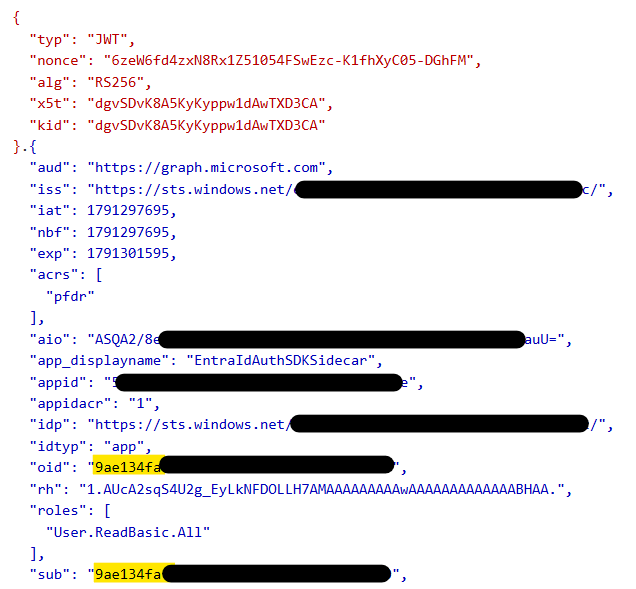
So the $token is a user token and the generated token now represents the web API itself (9ae134fa… is the object id of my service principal).
Just for fun, for Azure the request will look like this:
irm "http://localhost:8080/AuthorizationHeader/Azure?optionsOverride.RequestAppToken=true&optionsOverride.Scopes=https://management.azure.com/.default" -Headers @{ Authorization = "Bearer $token"} | % authorizationHeader
If you now check the server side, you will see that:
- You get retries for free
- In case of an Entra issue, the sidecar tries to reach backup endpoints
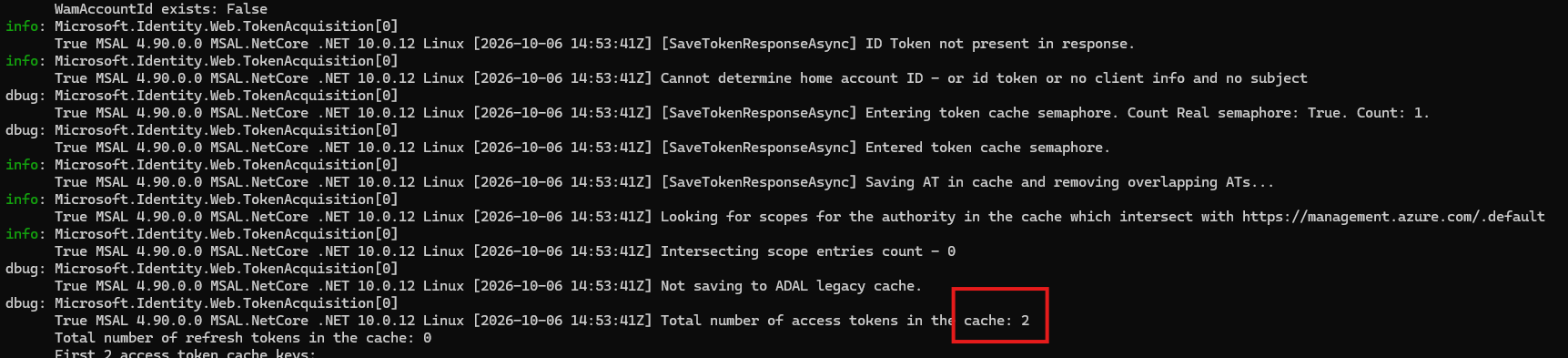
We can see that by default MSAL is using an in-memory cache. I don’t know if we can use a distributed/serialized cache instead; this is something to be tested for highly used web APIs.
DownstreamApi
If you don’t want to first call AuthorizationHeader and then call the backend API using the generated token (2 calls), you can fetch the token AND reach the backend API in a single call. In this article Microsoft explains when to use which solution, but long story short: unless you need fine-grained control over the received token and/or the backend API result, use DownstreamApi.
On Behalf flow (OBO)
So now, instead of only fetching a token to access Graph API, let’s directly fetch a token AND the associated value in one call:
$ClientId = "<your client Id>"
$TenantId = "<your tenant Id>"

# Generate a token to access your web API (previous article)
$token = Get-EntraToken -PublicAuthorizationCodeFlow -ClientId $ClientId -TenantId $TenantId -Resource Custom -CustomResource "api://$ClientId" -Permissions user_impersonation | % AccessToken
irm "http://localhost:8080/DownstreamApi/Graph?optionsOverride.HttpMethod=GET&optionsOverride.Scopes=user.read&optionsOverride.RelativePath=me" -Method POST -Headers @{'Authorization'="Bearer $token"} | % content | ConvertFrom-Json
Or if we try to decompose it (we can’t use straight splatting):
$base = "http://localhost:8080/DownstreamApi/Graph"

$query = [ordered]@{
    "optionsOverride.HttpMethod"      = "GET"
    "optionsOverride.Scopes"          = "user.read"
    "optionsOverride.RelativePath"    = "me"
}

# Join without escaping the values (matches your original URL byte-for-byte)
$qs = ($query.GetEnumerator() | ForEach-Object { "$($_.Key)=$($_.Value)" }) -join "&"

$headers = @{ 'Authorization'= "Bearer $token" }

$params = @{
    Uri     = "$base`?$qs"
    Method  = "POST"
    Headers = $headers
}

Invoke-RestMethod @params | % content | ConvertFrom-Json
Let’s explain a little. First we call the Graph endpoint (the base URL declared in the Docker command), and note that DownstreamApi expects a POST method and not a GET! Regarding the call that is made to the backend API (in this case Graph API), even if it’s not necessary, I’ve decided to explicitly expose the default GET method. Yes, we do a POST to call DownstreamApi, but we do a GET to fetch the /me Graph route.
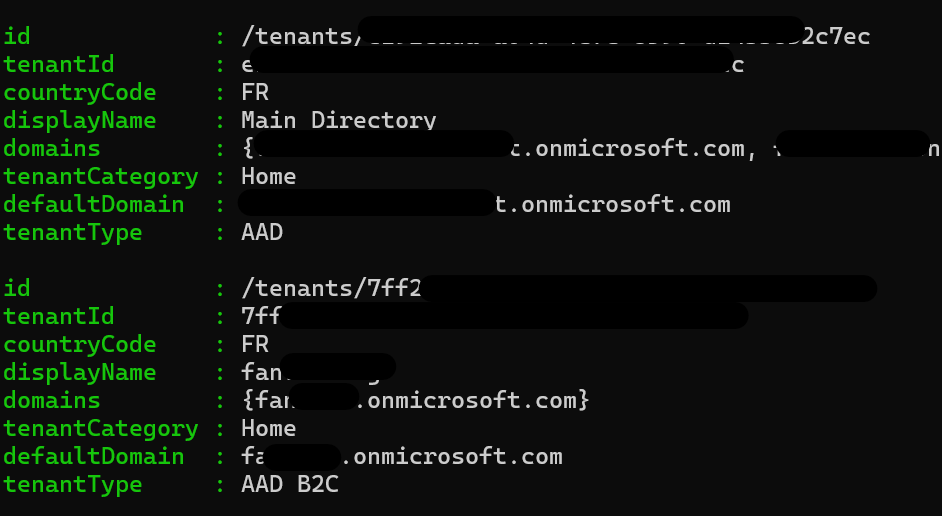
If we now try to do the same thing for Azure and fetch tenant information, here is what the query looks like:
irm "http://localhost:8080/DownstreamApi/Azure?optionsOverride.Scopes=https://management.azure.com/user_impersonation&optionsOverride.RelativePath=tenants?api-version=2020-01-01" -Method POST -Headers @{'Authorization'="Bearer $token"} | % content | ConvertFrom-Json | % value
As you can see, the RelativePath parameter is the rest of the query you need in order to call the Azure tenant ARM information (tenants?api-version=2020-01-01).
In my case, it returns:
Client credential flow
This will be almost the same story as before. Let me first consent to a new application permission for my application:
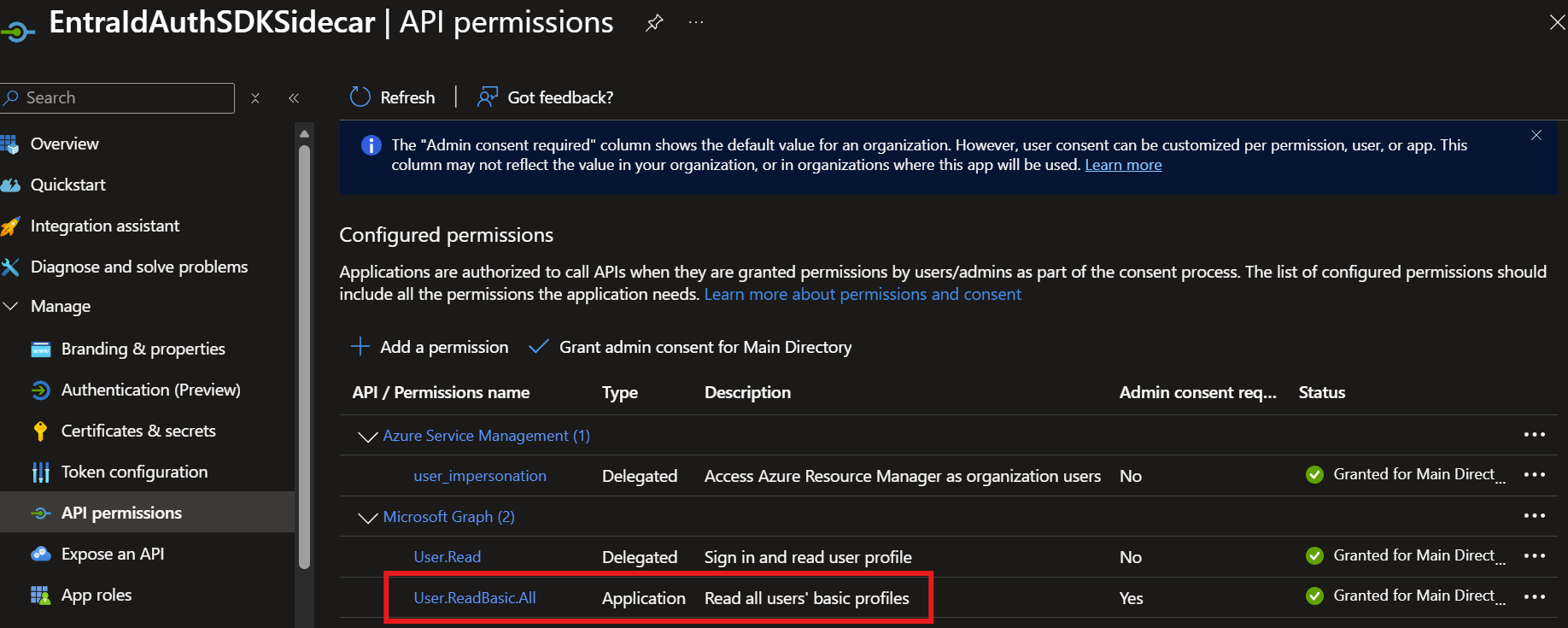
Now let’s fetch all users within our tenant:
irm "http://localhost:8080/DownstreamApi/Graph?optionsOverride.RequestAppToken=true&optionsOverride.Scopes=https://graph.microsoft.com/.default&optionsOverride.RelativePath=users" -Method POST -ContentType 'application/json' -Headers @{'Authorization'="Bearer $token"} | % content | ConvertFrom-Json | % value | select -f 2 | % displayName
That returns in my case:

And for Azure (just for fun):
irm "http://localhost:8080/DownstreamApi/Azure?optionsOverride.RequestAppToken=true&optionsOverride.HttpMethod=GET&optionsOverride.Scopes=https://management.azure.com/.default&optionsOverride.RelativePath=tenants?api-version=2020-01-01" -Method POST -ContentType 'application/json' -Headers @{'Authorization'="Bearer $token"} | % content | ConvertFrom-Json | % value
But this time, because my service principal only has read access to my main Azure tenant (and not the B2C one), the result is:

Unauthenticated
I’m not sure why I’m exposing this path (YOLO), but if you really don’t want to protect your web API, the Entra Id Auth SDK sidecar gives you an option for both the AuthorizationHeader and DownstreamApi routes.
To enable it, in the container configuration, you simply have to add Sidecar__AllowOverrides__CallDownstreamApiUnauthenticated=true, so for example:
docker run --rm -it -p 8080:8080 \
     -e AzureAd__ClientId=$CLIENTID \
     -e AzureAd__TenantId=$TENANTID \
     -e AzureAd__Audience=$AUDIENCE \
     -e AzureAd__ClientCredentials__0__SourceType=ClientSecret \
     -e AzureAd__ClientCredentials__0__ClientSecret=$SECRET \
     -e Sidecar__AllowOverrides__CallDownstreamApiUnauthenticated=true \
     -e DownstreamApis__Graph__BaseUrl=https://graph.microsoft.com/v1.0 \
     -e DownstreamApis__Azure__BaseUrl=https://management.azure.com \
     -e ASPNETCORE_ENVIRONMENT=Development \
     mcr.microsoft.com/entra-sdk/auth-sidecar:1.1.2-azurelinux3.0-distroless
A few things to know: you MUST be in Development mode to be able to use this “new” DownstreamApiUnauthenticated endpoint. So for example, I’ve executed:
irm "http://localhost:8080/DownstreamApiUnauthenticated/Azure?optionsOverride.RequestAppToken=true&optionsOverride.Scopes=https://management.azure.com/.default&optionsOverride.RelativePath=tenants?api-version=2020-01-01" -Method POST | % content | ConvertFrom-Json | % value
But honestly, this goes against all the principles of this tool. Don’t use it, or please tell me why you absolutely have to use it on your side.
Conclusion
In this article, we’ve explored how to call a backend API from your web API thanks to this sidecar technology. We’ve seen that this tool is very customizable: you can have multiple secret solutions (secret/cert/MI), multiple backend APIs (Graph, Azure, Custom API), with or without AuthN… The more I use it, the more I consider it a must-have tool when you plan to build and expose a web API.